Know what’s safe to spend before payday
RandTracker is a budget built around the South African payday. Your debit orders are set aside before they go off, so the figure you see is what’s really yours to spend.
Try it before you make an account. No bank login needed.
Safe to spend until payday
R 8,860.49
About R 738.37 a day for 12 days
- In cheque and cash
- R 16,529.15
- Debit orders to come
- −R 6,397.99
- Set aside in budgets
- −R 1,270.67
- Safe to spend
- R 8,860.49
- 13 NovDiscovery Health13 Nov−R 2,850.00Coming
- 17 NovCar insurance17 Nov−R 1,120.00Coming
- 18 NovNetflix18 Nov−R 199.00Coming
- 20 NovPrepaid electricity20 Nov−R 750.00Coming
- 20 NovSpotify20 Nov−R 79.99Coming
- 20 NovVodacom contract20 Nov−R 399.00Coming
- 23 NovGroceries top-up23 Novup to−R 1,000.00Coming
- 25 NovSalary25 Nov, payday+R 32,500.00Payday
A made-up demo account, with figures the app worked out itself. Drag through the days, or let it play.
Just paid? Say it, or type it
Describe what happened in your own words. RandTracker shows the amount, the account and the category it understood, and saves nothing until you check it.
- Speak or type, in English as you’d say it
- Money into your TFSA records both sides
- 15 free tries, then part of RandTracker Plus
Say it or type it
- 12 NovCheckers−R 1,915.40
- 10 NovShell−R 870.00
Ask about your money, get the figures
Tap a question and get a short answer with the exact figures behind it, worked out by RandTracker from your own books. It describes your money and never gives financial advice.
What’s safe to spend, and which debit orders are due before payday?
You can safely spend R8,860.49 before payday on 25 November, about R738.37 a day. Seven debit orders totalling R6,397.99 are still to come, starting with Discovery Health today (R2,850.00).
- Safe to spend
- R 8,860.49
- A day, for 12 days
- R 738.37
- Debit orders still to come
- R 6,397.99
In the app, the answer links to Schedules
Example answers from the demo account. Part of RandTracker Plus.
Any other accounts?
Describe your other accounts
One free description for each step while you set up, even before you make an account.
Set up by describing it
The setup wizard asks about your accounts, income, bills, debts and budget. Fill in the forms, or say it once per step and check what it understood.
Free while you set up, even before you make an account. Every card can be changed before it’s added, and your first salary still sets your payday.
For your own money
Stop finding out at month-end. Plan from one payday to the next, and see the debit orders before they leave your account.
- A clear Safe to spend figure until payday
- A debt-free date you can move with extra payments
- Goals, investments and stokvels in one place
For the people you share it with
Run the groceries, rent and school fees together, without opening up everything else.
- A shared set of accounts and budgets
- Everyone works from the same figures
- Personal finances stay private to each person
Every screen, in the app’s own menu
Open any line to see the screen. They’re from the real app, with the demo account.
Everyday
The screens you open most: what is safe to spend, what went out, and what is about to.
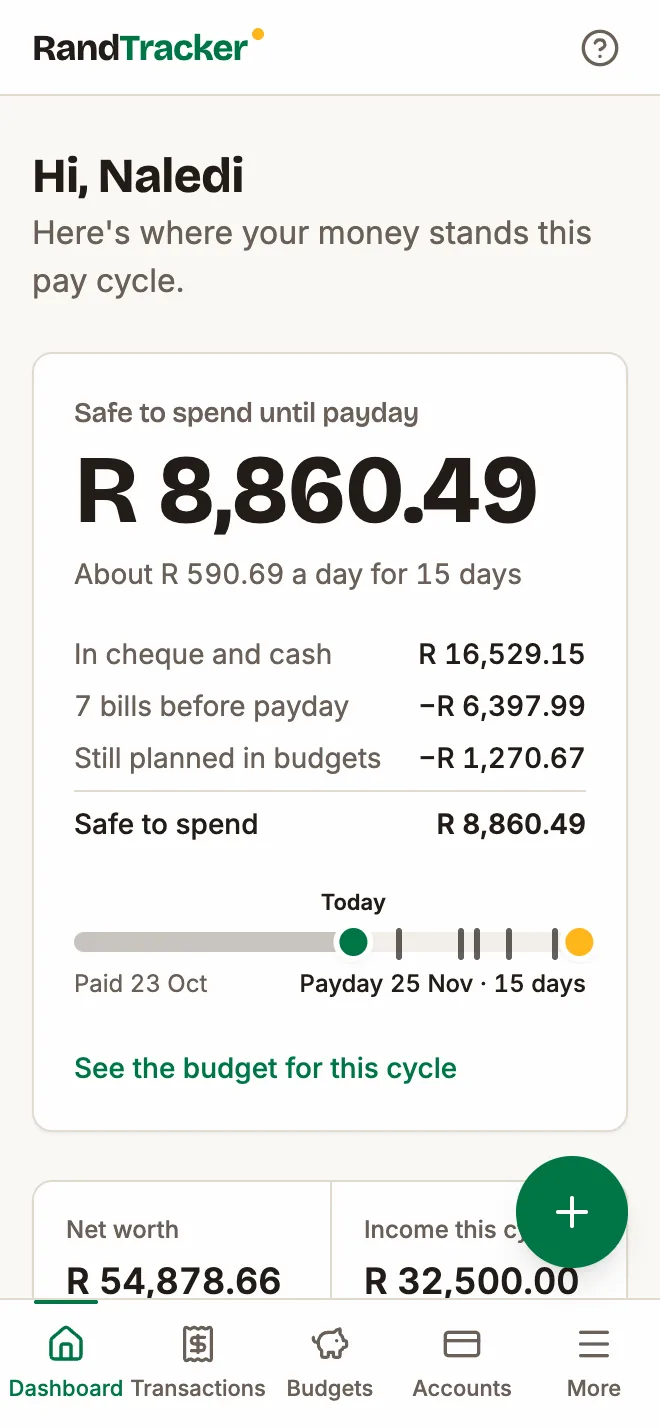
DashboardOne answer before you buy anything
One answer before you buy anything
Safe to spend takes your cheque and cash balances, removes the bills still due before payday and what you have planned in your budgets, and shows what is really left.
- Warns you if an account could run short, and names the bill that causes it
- Shows upcoming debit orders, cash flow, net worth, your debt-free date and TFSA room
- Arrange the widgets to suit how you work
TransactionsEvery rand in one searchable list
Every rand in one searchable list
Add a transaction in a few taps, or import a statement from your bank and review it before anything is saved.
- Import PDF, CSV, OFX, QFX or QIF statements, with repeats skipped automatically
- Split one payment across categories, and record transfers and refunds properly
- Filter, save your filters, edit in bulk and undo a delete

BudgetsA budget month that starts on payday
A budget month that starts on payday
Paid on the 25th? Your budget runs from the 25th. If that falls on a weekend or public holiday, the month starts on the working day before, when the money actually arrives.
- Give every rand a job and see what is available in each category
- Overspending comes out of next month, and unused money can carry over
- Fill empty categories repeats last month in one click, and history shows how you did

SchedulesDebit orders, seen coming
Debit orders, seen coming
Salary, rent, insurance and subscriptions are listed before they happen, so month-end holds fewer surprises.
- Dates move around weekends and South African public holidays
- Each schedule can post itself or ask you first
- Find schedules spots regular payments in your history and totals your subscriptions

Money
Everything you own and owe, and where it should go next.
AccountsEverything you own and owe
Everything you own and owe
Cheque, savings, cash, credit cards, store cards, loans and investments come together into one net worth figure.
- See how much of each credit limit you are using
- Reconcile an account against your bank statement balance
- Balances update themselves as transactions change

DebtsA date you can aim for
A date you can aim for
Add your cards, store cards and loans, then see exactly when you would be debt-free and what it would cost in interest.
- Compare the avalanche and snowball methods, or set your own order
- Slide an extra monthly payment and watch the debt-free date move
- Each payment is split into interest and capital

GoalsSaving for something specific
Saving for something specific
Set a target and a date for the emergency fund, December holiday or next big purchase.
- Progress and amount remaining at a glance
- Link a goal to the account holding the money
- See how many days are left

InvestmentsYour TFSA limits, watched for you
Your TFSA limits, watched for you
Track tax-free savings, unit trusts, ETFs, shares, fixed deposits and retirement annuities next to the rest of your money.
- Follows your yearly and lifetime TFSA limits as you contribute
- Record contributions, withdrawals, dividends, interest and fees
- Gains and returns per holding, included in your net worth

Together
Money you share with the people you live with, or save with.
HouseholdShared money, private money
Shared money, private money
A household is a separate set of accounts and budgets for the people in it. Nothing from your personal finances is copied in.
- Invite someone with a single-use code
- Switch between your own books and the shared ones
- Everyone in the household works from the same figures

StokvelsYour stokvel, on the books
Your stokvel, on the books
Rotating, savings, grocery and burial stokvels each get a record of what you have paid in and what is due back.
- Log contributions and payouts as they happen
- See your next payout date and roughly how much to expect
- Keep several groups side by side

Insights
What the last few months actually looked like.
ReportsWhere the money went
Where the money went
See money in and out by month, your net worth over time, and a diagram that follows your income into each spending category.
- A calendar view of what happened on which day
- A tax-year summary running March to February
- Compare this cycle with the last and with your average

AnalyticsThe patterns behind the totals
The patterns behind the totals
Spending trends, category breakdowns and your savings rate for the period you choose.
- See which payees you spend the most with
- Check how each budget is holding up
- Income broken down by source

Set up once
Less typing from the start, and less every month after.
Setup wizardSet up in seven steps
Set up in seven steps
The wizard walks you through your main account, other accounts, income, bills, debts and a first budget, then lets you review it all. Type it into the forms, or describe each step in your own words.
- Your salary sets your payday
- Bills and debt repayments fill in your budget for you
- Stop at any point and carry on later

RulesCategorise once
Categorise once
Tell RandTracker what a bank description means, and it applies that to future imports.
- Start from a set of South African merchant rules
- It learns from the categories you correct
- Run a rule across your existing transactions

Built for how money works here
- Payday, not the 1st
- Budget months follow your payday and shift for weekends and public holidays.
- Debit orders
- See each one coming, and whether the account can cover it.
- Stokvels
- Contributions and payouts for rotating, savings, grocery and burial groups.
- TFSA limits
- Yearly and lifetime allowances tracked as you contribute.
- March to February
- A tax-year summary that matches the South African tax year.
- Local categories
- Groceries, Petrol, Airtime & Data, Medical Aid, School Fees and more, ready from day one.
Free to budget. Plus for the assistant.
Everything you need to plan your money is free. RandTracker Plus pays for the AI that understands what you say and answers what you ask.
Free
R0
for as long as you use it
- Budgets from payday to payday, Safe to spend and debit orders
- Accounts, debts, goals, investments, stokvels and reports
- Shared household books
- 15 free tries of “Say it or type it”
- Set up by describing it: one free description per step
RandTracker Plus
R49 a month
or R490 a year, two months free
- “Say it or type it” after the free tries
- “Ask about my money”: answers from your own figures
- Up to 500 uses a month, shared between them
- Cancel any time; a full refund within 7 days
Plus is paid through Polar, our payment partner, which handles receipts and VAT. Subscribe from Settings once your account is saved.
Your finances stay yours
- No bank logins
- You never give RandTracker your banking password. Transactions come from what you enter or import.
- Two-factor sign-in
- Protect your account with an authenticator app, with one-time recovery codes as a backup.
- Access enforced by the database
- Every row is tied to its owner, and the database refuses requests for anyone else’s data.
- Encrypted nightly backups
- Backups are encrypted before they leave the server.
- AI only when you switch it on
- “Say it or type it” and “Ask about my money” are off until you turn them on, and say what they send to our AI provider. What you say and ask isn’t kept, and nothing is saved until you check it.
- Your data is yours
- Export it whenever you like, or delete your account and everything in it.
What it doesn’t do
Better you know now.
- It doesn’t connect to your bank automatically. You add transactions yourself or import statements.
- It needs an internet connection, including when installed on your phone.
- It helps you see and plan your money, but it isn’t financial advice.
Questions
Is RandTracker free?
Yes. Everything you need to budget is free. RandTracker Plus, at R49 a month or R490 a year, adds “Ask about my money” and keeps “Say it or type it” going after its 15 free tries.
What does the AI see?
Only what each feature needs, and only once you switch it on: what you say or type, the names of your accounts and categories, and for “Ask about my money”, the figures that answer your question. RandTracker works out every figure itself, and our AI provider puts it into words. It never gives financial advice.
Do I need to link my bank account?
No. You add transactions yourself or import a statement downloaded from your bank, in PDF, CSV, OFX, QFX or QIF format.
Can my partner and I share a budget?
Yes. Create a household and invite them with a code. It has its own accounts and budgets, and each person’s personal finances stay private.
Does it work on my phone?
Yes. It runs in your phone’s browser and can be installed to your home screen like an app. It needs an internet connection.
Who can see my information?
Only you, plus the people in any household you choose to join, and only for that household’s books.
Can I take my data with me?
Yes. Settings lets you export your data, and you can permanently delete your account at any time.
Start with your next payday
The setup wizard takes you from your first account to your first budget, typed or described. Make your account at the end.